
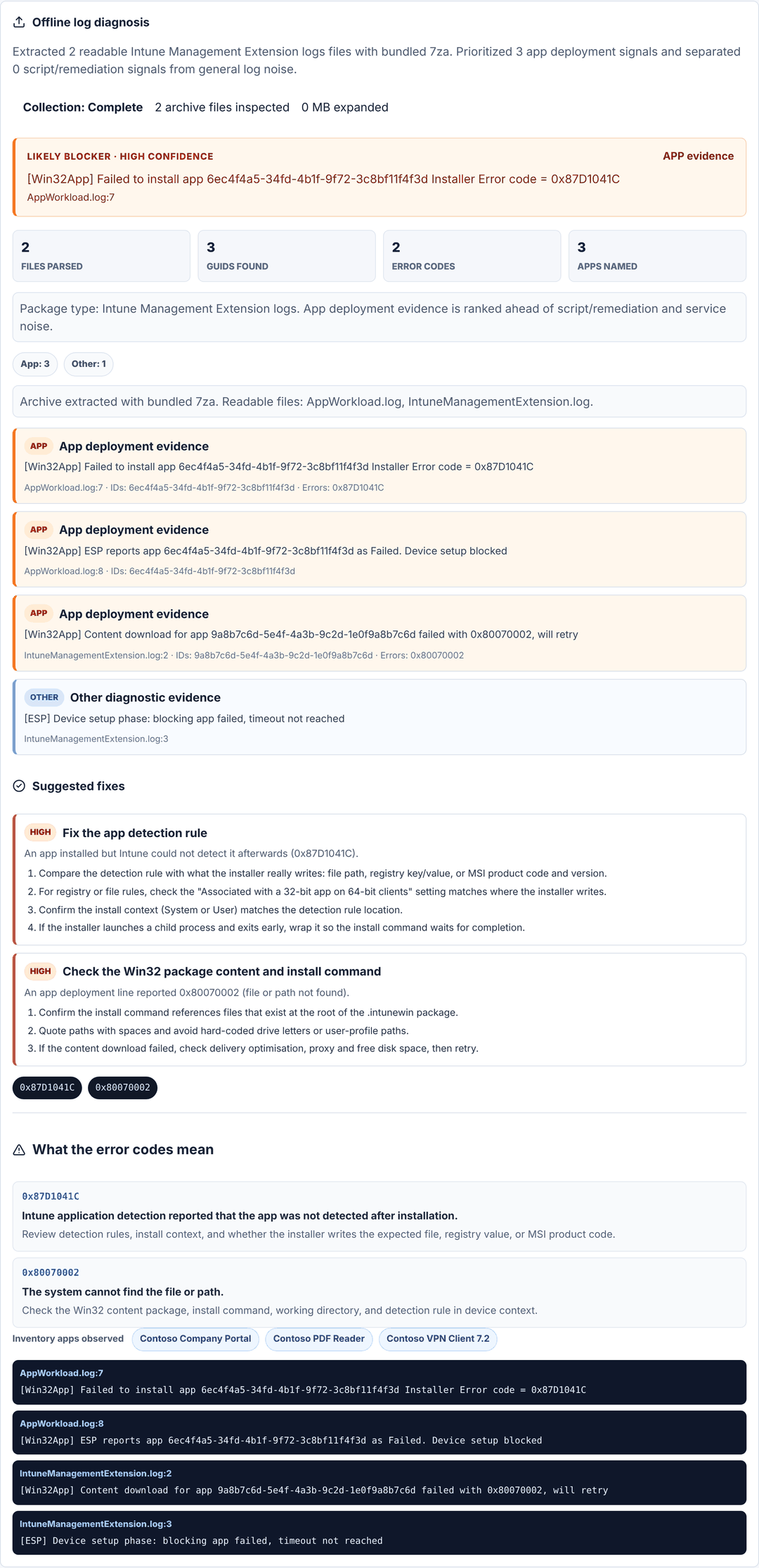
About this example. The input is a test CAB we built containing two Intune Management Extension logs: one app (Contoso VPN Client 7.2) installs but fails detection with 0x87D1041C, and a second app has a content download error 0x80070002. Everything below is what PilotTrace produced from it.
1. The input
| Item | Value |
|---|---|
| Package | Contoso-Autopilot-Test.cab (2 log files) |
| Files read | AppWorkload.log, IntuneManagementExtension.log |
| Apps in scope | Contoso VPN Client 7.2, Contoso Company Portal, Contoso PDF Reader |
2. Likely blocker
PilotTrace ranks app deployment evidence ahead of general noise and picks the line that records an actual install failure:
AppWorkload.log:7
[Win32App] Failed to install app 6ec4f4a5-… Installer Error code = 0x87D1041C
Confidence: high, because the line is app deployment evidence with a non-zero error code and an explicit failure.
3. What the error codes mean
| Code | Meaning | Where to look |
|---|---|---|
0x87D1041C | The app installed, but Intune's detection rule did not find it afterwards. | Detection rule, install context, 32/64-bit setting. See the 0x87D1041C guide. |
0x80070002 | The system cannot find the file or path. | Win32 package content, install command, working directory. |
4. Suggested fixes
- Fix the app detection rule. Compare the rule with what the installer really writes (file, registry or MSI product code), check the 32-bit/64-bit setting and the install context.
- Check the Win32 package content and install command. Make sure the command references files at the root of the
.intunewinpackage.
5. What PilotTrace does not claim
A report points to the most likely blocker and shows the evidence behind it. It does not replace checking the app's configuration in Intune. If the evidence is thin or files were skipped, the report says Partial instead of guessing.
Try it with your own package
Text logs are read in your browser. CAB/ZIP archives are unpacked on our server and deleted straight after.
Analyze a diagnostic package